Load profile: ASCII file definition
The most flexible way of defining a custom load profile, is to import it from an hourly file that is written in CSV format.
The file may contain hourly or sub-hourly values, which after importing can be rescaled to match a given yearly consumption.
The simulation can then either use the values that were stored at the moment of importing, or import the file every time the simulation is started (see below).
The format of the columns in the CSV-file have to follow the PVsyst standard format described below.
Importing the file
Click on the  button , navigate to the location where the file with the load profile is stored on your disk, and select the file. When the file is successfully imported, its raw contents is displayed on the bottom left part of the window.
Below the file name, several summary values will be displayed. You can find the average and maximal load, as well as the total yearly consumption. It is possible to rescale the yearly consumption to a given value, in order to match the profile to a measured or expected consumption.
If you go to the Tab 'Graph', you can view the imported profile as an hourly time series or as integrated daily or monthly values. A smaller preview of this graph is shown on the first tab.
Selecting a template
To simplify the use of typical load profiles, there is a drop-down selection of preexisting templates. The list shows all CSV-files in the Templates sub-folder of the current PVsyst workspace, which have a file name starting with 'LOADPROFILE_'. Selecting an entry from this list will automatically load the corresponding file.
To populate the Templates folder with some example files, you can select 'Reload Templates' in the workspace manager dialog. The examples are taken from the BDEW website, the German grid operators association. There are eleven examples in total, which are summarized in the table below. All profiles are normalized to a consumption of 1MWh per year. For more details please visit the BDEW web page for typical load profiles (in German).
| Profile | File Name | Description |
|---|---|---|
| Household_BDEW_H0 | LOADPROFILE_Household_BDEW_H0.CSV | Typical profile for private household |
| Commercial_BDEW_G0 | LOADPROFILE_Commercial_BDEW_G0.CSV | Weighted average of the commercial profiles G1-G6 |
| Commercial_BDEW_G1 | LOADPROFILE_Commercial_BDEW_G1.CSV | Commercial with no weekend activity |
| Commercial_BDEW_G2 | LOADPROFILE_Commercial_BDEW_G2.CSV | Commercial with mainly lighting consumption |
| Commercial_BDEW_G3 | LOADPROFILE_Commercial_BDEW_G3.CSV | Commercial with close to constant consumption |
| Commercial_BDEW_G4 | LOADPROFILE_Commercial_BDEW_G4.CSV | Commercial following the common shopping opening hours |
| Commercial_BDEW_G5 | LOADPROFILE_Commercial_BDEW_G5.CSV | Commercial, Bakeries |
| Commercial_BDEW_G6 | LOADPROFILE_Commercial_BDEW_G6.CSV | Commercial with increased weekend activity |
| Agricultural_BDEW_L0 | LOADPROFILE_Agricultural_BDEW_L0.CSV | Weighted average of agricultural profiles L1 and L2 |
| Agricultural_BDEW_L1 | LOADPROFILE_Agricultural_BDEW_L1.CSV | Agriculture, dairy |
| Agricultural_BDEW_L2 | LOADPROFILE_Agricultural_BDEW_L2.CSV | Agriculture linked to a household |
You can also add your own templates to the 'Templates' folder in the PVsyst workspace. Files having a name that starts with 'LOADPROFILE_', will show up as an entries in the templates selection.
Using the profile in the simulation
In the dialog you can specify how the values from the file will be used in the simulation:
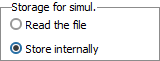
- 'Store internally' is the default choice. The imported values, including a possible rescaling, will be stored in the variant and these values will be used in subsequent simulations. Any future changes in the original data file will have no effect on the stored values, unless you import them once again. However, if the rescaling factor is changed, the values will be multiplied with the corresponding factor.
- When selecting 'Read the file', PVsyst will copy the file to the folder 'UserHourlyParams' in the PVsyst workspace. From there, it will read the file every time the simulation of the variant is launched and, if defined, apply the rescaling factor. These values will then be stored in the variant, together with the simulation results. This mode is particularly useful when changing the load profile in the batch mode.
Sub-hourly data
The files with the load profiles may contain sub-hourly data (for example load profiles in 15-minutes steps). When the PVsyst simulation proceeds in hourly steps, this data will be converted into hourly values when the file is imported.
The time step and the correct handling of the values are automatically recognized according to the date/time stamps and the specified units. Power units in [W] or [kW] will be averaged, Energy units in [Wh] or [kWh] will be summed within each hour.
Hourly Parameters file
The ASCII input source file can be prepared in a spreadsheet program (like MS-EXCEL), in the CSV-format (Comma Separated Values, separator may be semicolons or commas).
You can find a template named "PARAMS_Hourly_Template.CSV" :
- either in the program's location, usually C:\Program files \PVsyst8.x DataRO\PVsyst8.1_Data\Templates.
- or in your workspace
C:\users\YourSession\PVsyst8.1_Data\Templates\.
In the latter case you can update/reload this file using Files > Workspace > Reload templates in the main menu.