Installation and operating costs
Costs dialog in economic evaluation defines all the initial charges and running costs of the system in order to calculate total investment, yearly cost and energy cost.
Costs can be defined globally, by pieces, by installed Wc or by m².
You can work with any currency, and pass from one to another by a selection in the list box. The button Rates allows to adjust their relative parity. Choosing one of them as a reference, you can manually modify or download from the internet the exchange rates or add new currencies.
Installation costs
This section determines direct and indirect installation costs of the system.
This includes component costs (modules, inverters, batteries, pumps, controllers, generator), expenses for studies and analysis, administrative fees (grid-connection cost, bank charges, permitting, taxes), insurances, land costs, substitution credit and subsidies. The number and type of PV involved components (PV modules, inverters, batteries, etc.) are automatically updated from the simulation parameters.
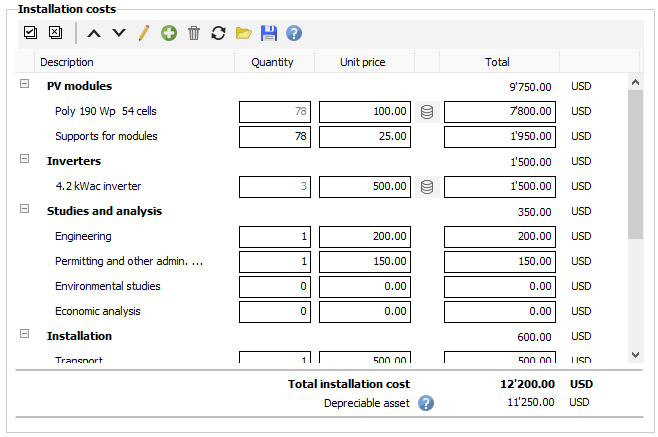
Depreciable asset
Depreciation is an accounting method of allocating the cost of a tangible asset over its useful life and is used to account for declines in value. The yearly depreciation allowance is tax deductible and decreases the taxable amount.
None: depreciation is not taken into account in the financial results
Straight-line: the value of depreciable assets is reduced uniformly each year until it reaches its salvage (residual/scrap) value.
Annual depreciation allowance = (Depreciable assets - Salvage value) / Depreciation duration
Example : for a 120 000$ depreciable assets amount, with a salvage value of 20 000$ at the end of project lifetime and an asset accounting life of 10 years, the yearly depreciation allowance would be (120 000 - 20 000) /10 = 10 000 $.
Declining balance: accelerated depreciation method that records larger depreciation expenses during the earlier years of depreciable assets life, and smaller ones in later years. This calculation method uses the straight-line depreciation rate and a depreciation coefficient :
Straight-line rate = 1 / Project lifetime
Declining balance rate = Straight-line rate x Depreciation coefficient
Annual depreciation allowance for year t = Residual asset value for year t x Declining balance rate
When the depreciation allowance becomes lower than the straight-line depreciation allowance, the straight-line method is applied for the last years of the project.
Component and accessories costs are set as depreciable by default in Pvsyst.
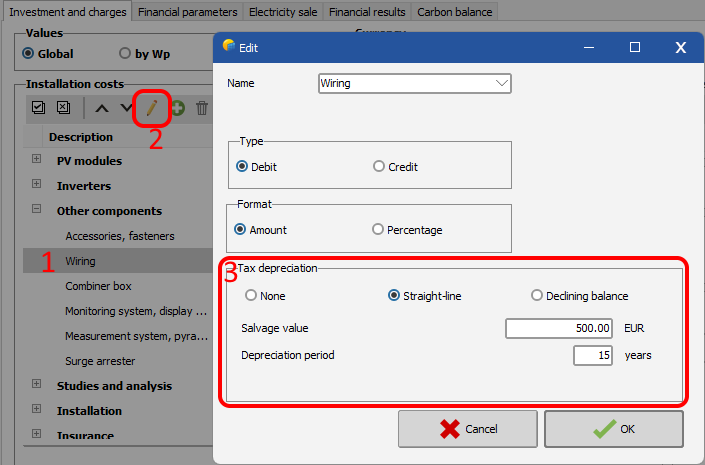
To define depreciation parameters for each asset :
- click on a cost to select it
- click on edit button (pen)
- select a depreciation method (straight-line or declining balance) from the opening dialog, depending on your country and tax system
- set the salvage value (total estimated residual value of the asset at the end of the project)
- set the depreciation period (time over which the asset is expected to be useful). Each asset has a specific depreciation duration defined by your tax system.
- click on OK
Add/delete/update costs
The predefined cost list is fully customizable to take into account any specific cost of your system which is not present in the predefined list. You can add, remove, reorder or rename costs. You can also save the defined cost list as a template in order to reuse it in another project.
Installation costs toolbar
 Select all
Selects all the installation costs to be deleted, edited or moved.
 Unselect all
Unselects all the selected costs. This button is disabled if no cost is selected.
 Move up
Moves up selected costs. The installation costs list displayed in the printed report uses this order. This button is disabled if no cost is selected.
 Move down
Moves down selected costs. The installation costs list displayed in the printed report uses this order. This button is disabled if no cost is selected.
 Update cost
Opens the installation cost edition dialog to update properties (name, section, type) of a selected cost. This button is disabled if no cost is selected or more than one cost are selected.
 New cost
Opens the installation cost edition dialog to add a custom cost if it is not existing in the predefined list.
 Delete cost
Deletes selected installation costs from the list. This button is disabled if no cost is selected.
 Restore cost list
Restores installation costs to Pvsyst default predefined cost list.
 Load installation costs from template
Loads cost list from a previously saved template file.
 Save installation costs as template
Saves all defined installation costs in a template file in order to be reused later or in a different project.
 Open component form
Prices can be defined for each component. When clicking this button, you may define your own prices for the components used, either for one piece, or discount price for several pieces. These prices may be either saved in your component library, or just kept for the current session, without modifying the component database. Prices can also be defined globally in price list dialog from component database.
Operating costs
This section defines the running expenditures of the system.
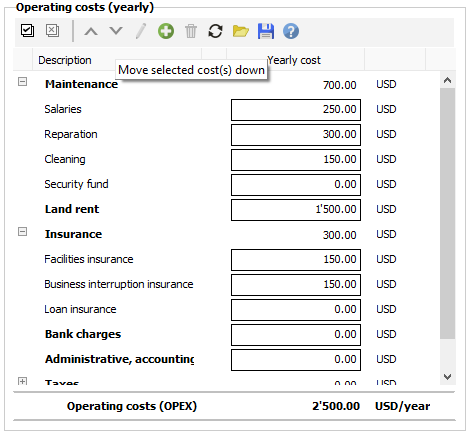
The predefined cost list depends on the system type.
- For a grid-connected system, usually very reliable, they are limited to an annual inspection, eventually some cleaning of the collectors and the insurance fees. Some inverter suppliers provide a long-term payable warranty, including replacement, which is assimilable to an insurance.
- For a stand-alone system, one should add maintenance costs and replacement costs for components such as batteries. Moreover, when using an auxiliary generator the program computes the used fuel cost.
- For pumping systems, one may also define pump replacement costs, and battery replacement costs when batteries are used in the system.
As for installation costs, operating costs are fully customizable to fit the specific needs of your system. The total sum of operating costs is called OPEX (for Operational Expenditure).
Operating cost scheduling
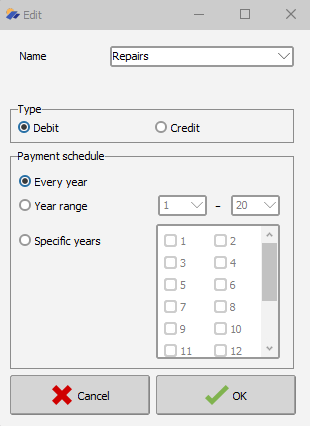
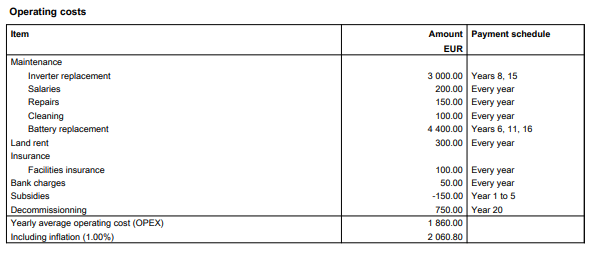
When creating or editing an operating cost, you can define the payment schedule:
- Every year: the cost is applied over the whole project lifetime. For example, this can be used for recurring costs such as cleaning or salaries.
- Year range: the cost is only applied between two selected years. For example, this can be used for a subsidy or a temporary charge applicable only during a limited period of the project.
- Specific years: the cost is only applied to the checked years. For example, this can be used for costs occurring at specific times, such as replacement costs at the end of a component lifetime or a decommissioning study or end-of-life compliance cost in a late project year.
The defined payment schedules are also reported in the operating costs table of the report, as shown below.
Replacement costs
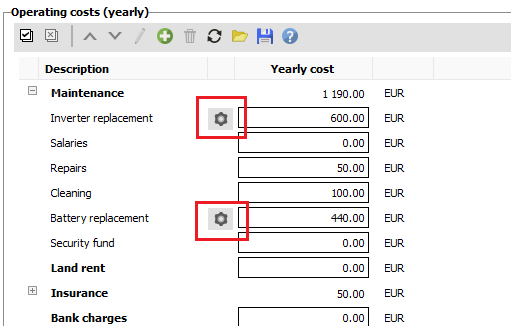
For component costs that need to be replaced over the project lifetime, such as inverters, batteries, and pumps, this tool calculates the replacement amount and payment schedule. These dialogs can be opened by clicking the corresponding replacement buttons in the operating costs table, highlighted in red below.
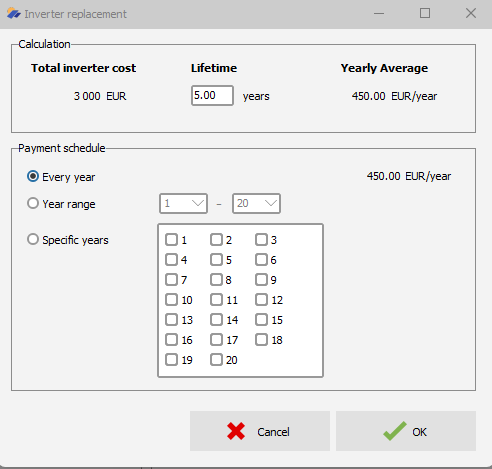
The same payment schedule logic is available for replacement costs (inverter, battery or pump). Replacement entries are not limited to a yearly provision based on the initial cost and lifetime of the component. They can be scheduled over the whole project lifetime, over a selected year range, or on specific years only.
The amount allocated to each payment is automatically recalculated according to the selected payment schedule, the total component cost, and the component lifetime.
When Specific years is selected, PVsyst automatically checks the years corresponding to the replacement interval derived from the component lifetime. These proposed years can then be modified if needed.
Add/delete/update costs
The predefined operating cost list is fully customizable to fit the specific needs of your system. You can add, remove, reorder or rename costs. You can also save the defined cost list as a template in order to reuse it in another project.
Operating costs toolbar
Select all
Selects all the operating costs to be deleted, edited or moved.
Unselect all
Unselects all the selected costs. This button is disabled if no cost is selected.
Move up
Moves up selected costs. The operating costs list displayed in the printed report uses this order. This button is disabled if no cost is selected.
Move down
Moves down selected costs. The operating costs list displayed in the printed report uses this order. This button is disabled if no cost is selected.
Update cost
Opens the operating cost edition dialog to update properties (name, section, type) of a selected cost. This button is disabled if no cost is selected or more than one cost are selected.
New cost
Opens the operating cost edition dialog to add a custom cost if it is not existing in the predefined list.
Delete cost
Deletes selected operating costs from the list. This button is disabled if no cost is selected.
Restore cost list
Restores operating costs to Pvsyst default predefined cost list.
Load operating costs from template
Loads cost list from a previously saved template file.
Save operating costs as template
Saves all defined operating costs in a template file in order to be reused later or in a different project.
Financial summary
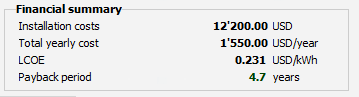
The Total yearly cost is the sum of running costs and loan annuities (defined in Financial Parameters). It is an annual average value on project duration including the inflation rate if defined.
The LCOE (Levelized Energy Cost) is the price of the produced kWh. It takes into account the present value of future cashflows by applying a Discount Rate.
The formula used in Pvsyst for LCOE calculation is :
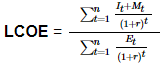
It = Investment and expenditures for the year (t)
Mt = Operational and maintenance expenditures for the year (t)
Et = Electricity production for the year (t)
r = Discount rate that could be earned in alternative investments
n = Lifetime of the system
The Payback period is the duration required to recover the initial investment.