Spectral Correction
Spectral correction accounts for changes in the solar spectrum due to atmospheric scattering and absorption. These changes depend on atmospheric water content, aerosols, and the light's path length, expressed as Air Mass (AM). PVsyst implements several models to describe spectral correction:
- The CREST model that is used for amorphous silicon modules. This correction is applied automatically when spectral correction is activated.
- The spectral correction for PV modules in the Sandia database. This correction is applied automatically when spectral correction is activated.
- The FirstSolar spectral correction model that is disabled by default, and can be turned on by the user.
First Solar Spectral correction model management
The FirstSolar spectral correction model is switched on in the dialogue 'Detailed losses':
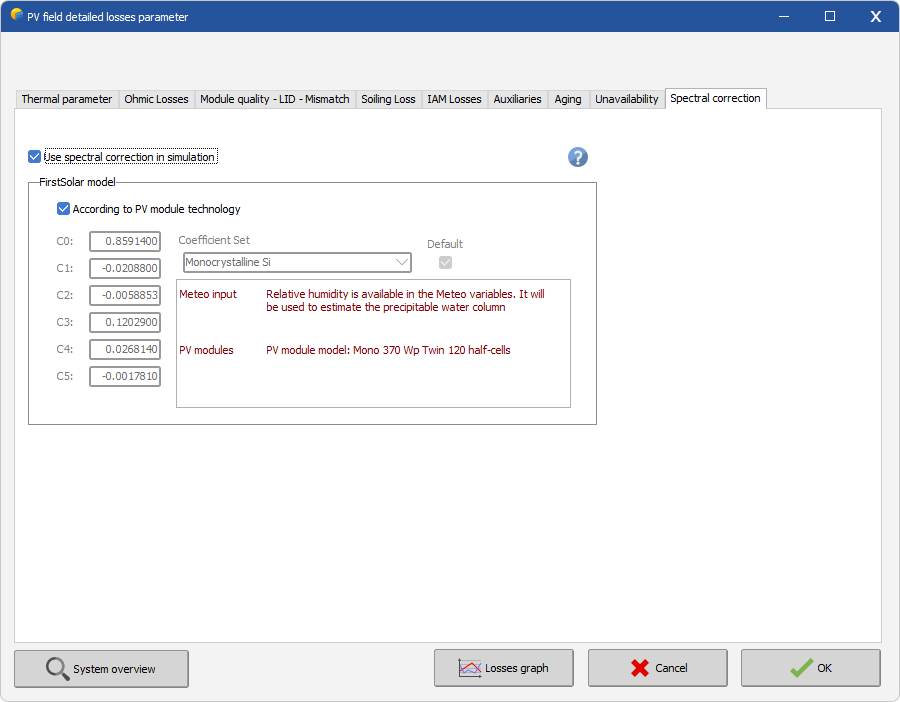
When spectral correction is enabled, the coefficient set matching the PV module technology is used by default during simulation. You can override this by unchecking the corresponding box and selecting any available coefficient set. In this case, the coefficient set will not follow any changes to the PV module in system definitions, and it is your responsibility to ensure that the chosen set is appropriate for the simulation.
The FirstSolar spectral correction model uses Air Mass and Precipitable Water Column as input variables. Air mass is calculated from altitude and sun position, while precipitable water must either be in the weather data file or be estimated from relative humidity. Therefore, this correction can only be applied during simulation if either precipitable water or relative humidity is present in the weather data. For synthetic hourly weather data files created with PVsyst 6.7.4 or later, relative humidity is always present.
If spectral correction is used in the simulation, it will be noted on the final report. The system summary will list the coefficient set used, and the loss diagram will include a 'spectral losses' contribution.