LowLight analysing Tool
Low-light tool
PVsyst proposes a tool for the analysis of these data, and the determination of the suited Rserie and Rshunt.
In the PV module dialog, choose the page "Additional data > Low-light data".
NB: The "parent" PV module must be fully defined (without errors) before using this tool.
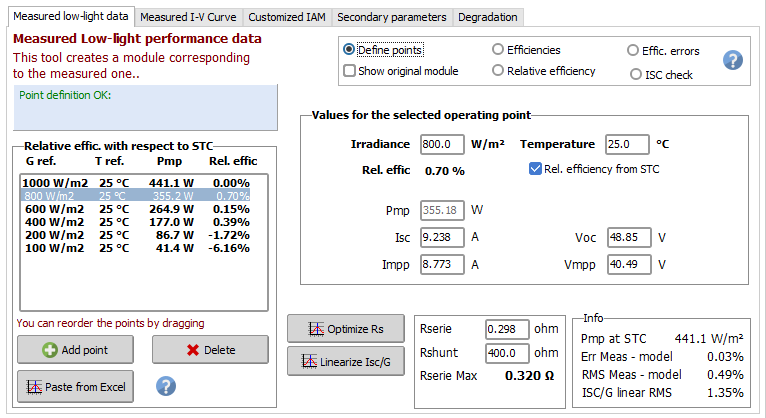
Here you should define some operating points at specified irradiance and temperature values. You typically choose normalized irradiances as listed in the IEC 61853 standard table (1100, 1000, 800, 600, 400, 200, 100 W/m²). Values at 25°C are generally sufficient for accurate evaluation of Rseries/Rshunt.
Manually defining operating points
The operating points are referenced in the listbox.
For each point, you may define:
- If option "Rel. efficiency from STC" is unchecked:
- Only the relative efficiency with respect to the efficiency at 1000 W/m2. This is very simple, but not very useful in practice.
- Or just the Power at this operating condition.
- When you check "Rel. efficiency from STC":
- The full data (Isc, Voc, Imp, Vmp), from which the power Pmp will be calculated. |
You can move points by dragging in the Listbox.
Importing table from Excel
This input can be tedious within this dialog. Instead, you can prepare a table in Excel and import it directly via copy/paste. When the clipboard holds a valid table, a button Paste from EXCEL will appear.
STC reference point
In any case, these values should include the full definition of the STC point (Gref = 1000 W/m², Tref = 25°C), as this is the basis for constructing the One-diode Model, and the reference for the relative efficiencies.
When opening the tool initially, the STC point is already present, initialized with the values from the parent PV module (typically Imp, Vmp, and other datasheet values).
However, the actual measured data will always differ, representing the actual measured module. You have to update this point with a full STC data point (Isc, Voc, Imp, Vmp).
If you define points at other temperatures than 25°C, the reference point at GRef = 1000 W/m² and for your temperature will be calculated by the model, using namely the muPmpp parameter.
Optimizing Rserie
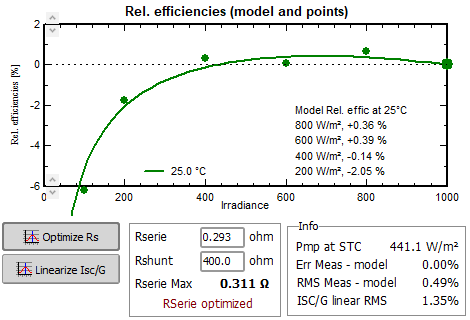
This tool aims to find a series resistance that minimizes the difference between the measured points and the model.
This is done by the button Optimize Rs. You will obtain an adjusted Rserie, so that the low-light behavior is matching the measurements at best.
You can get a graph of the relative efficiency, with a mention of the Model's low-light values. You can observe that the "Error Meas-Model)" = 0%, and the RMS (Measure - Model) = 0.49%.