Execute generation
The Synthetic Data generation tool in Databases is meant to generate hourly or sub-hourly data from monthly weather data. Afer creating a site for your location of interest, you may generate a .MET file with this tool by following these steps:
- Select the Source data in the list, (you can verify if it is the site you want with "Open").
- Choose the First Random Seed (between 1 and 10).
- Choose the
time step: 1 hour, 15 minutes, 5 minutes or 1 minute. - Press the Execute Generation button.
The option "Use monthly diffuse" will renormalize the generated diffuse values to the initial monthly input (close but not guarantied by default)
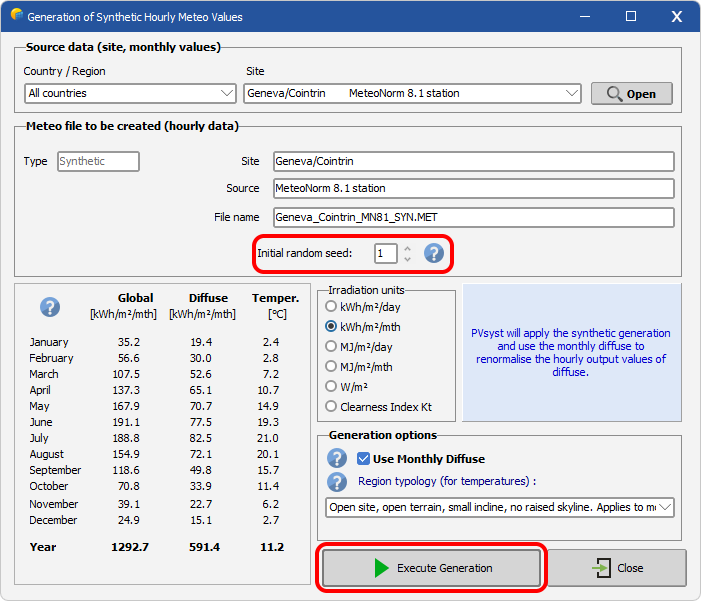
Random Seed
The stochastic generation process relies on a random number generator, which must be initialised with a starting value called a random seed. Two runs using the same seed will always produce the same sequence of synthetic data. By changing the seed, a different but equally statistically valid time series is generated — the monthly means remain unchanged, but the day-to-day and hour-to-hour sequences differ.
Diffuse renormalization
If checked, the (sub-)hourly diffuse values are renormalized in order to match the monthly diffuse, (when present in .SIT). This is done through a correction which is not Kt dependant: each hourly value is corrected by the ratio between the specified monthly value and the as-generated-hourly-cumulated monthly diffuse.
Region topology
When running a the synthetic data generation, the region topology can be specified. This will add a slight variation of the generated temperature profile as explained in the Meteonorm theory manual, table 7.2.2.
By default, the synthetic generation uses Meteonorm default mn_situation = open region typology. All options are:
open: Open site, open terrain, north-facing incline, no raised skyline. Applies to most sites.depression: Depression or very flat valley floor, in which cold air collects. In Switzerland, for example, particularly in the Jura and the Alps.cold_air_lake: Extensively cold hollows (above 1000 m).sea_lake: Shore of sea or larger lake (up to 1 km from the shore).city: Centre of a larger city (over 100'000 inhabitants).slope_south: South-facing incline (more than approx. 10° inclination, facing between SE–S–SW). At least 200 m above valley floor.slope_west_east: West or east-facing incline (more than approx. 10° inclination, facing between SW–W–NW or NE–E–SE). At least 200 m above valley floor.valley: Valley floor in mountainous valley at higher altitudes. Valley floor inclined (flat valleys are often treated as depressions).valley_foehn: Valley floor of Föhn valley (regions with warm descending air currents).valley_central_alps: Floor of large central Alpine valley (e.g., Alpine regions of Valais, Switzerland).valley_alpine_foothills: Valley floor in northern Alpine foothills.valley_slope_south: South-facing incline (more than approx. 10° inclination, facing between SE–S–SW) up to 200 m above valley floor.valley_slope_west_east: West or east-facing incline (more than approx. 10° inclination, facing between SW–W–NW or NE–E–SE) up to 200 m above valley floor.summit: Open summit above 500 m. Overlooking surroundings in all directions.
Please note that these region classification was developed on swiss wether data and might not extrapolate well to other climates.