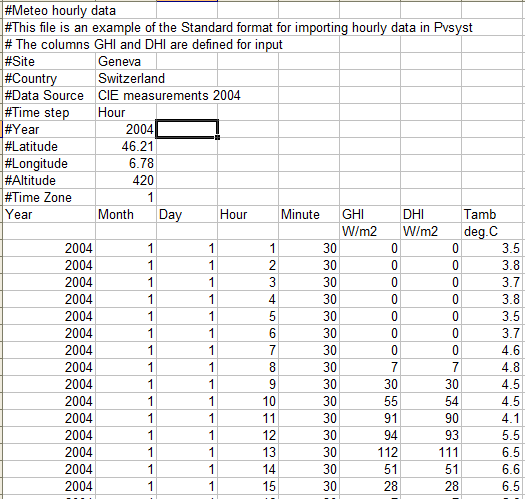
PVsyst standard format
The PVsyst standard format proposes a framework for preparing your hourly or subhourly weather data in a simple way in EXCEL (as a CSV file).
Like with the tool Import Custom Weather data files, you can import hourly or subhourly Weather data in virtually any text format, as far as you have the data of one time step on one line.
CSV File preparation
If you have access to reliable and clean data in hourly or subhourly values, you can manage them in a spreadsheet (like EXCEL) according to the format specified below, so that they can be imported directly into PVsyst with the tool Known Format. This format is also suited for the import of some other profiles as time-series, like a load profile, varying electricity tariffs along the year, or others in PVsyst.
Once your data has been prepared with EXCEL, you have to save it as a CSV (DOS) file.
The advantage of the PVsyst standard format is the simplification of the import process, as the Geographical site information is directly written in the file. But this tool doesn't include all securities and error recoveries present in the "Import Custom Weather data file" tool. It is only suited for clean data.
Templates
The PVsyst8.0_Data/Templates folder contains 2 examples of the PVsyst standard weather format csv files:
METEO_PVsyst_Standard_Geneva_GHI.CSVusing GHI and DHI as input (recommended)METEO_PVsyst_Standard_Geneva_GPI.CSVusing POA irradiance
If the files are missing, please reload as described here.
Description of the PVsyst Standard format
CSV file
"Comma Separated Values". Should be easily managed in EXCEL, saved as "CSV(DOS)" file format.
- Separator = semicolon or comma (depending on the Windows international settings),
- Decimal character should be a dot.
HEADER
All header and comment lines begin by #
The header may have as many comment lines as desired.
First line: serves as a file format identifier. It accepts one of two tags, indicating whether the file contains Typical Meteorological Year (TMY) data or Time series data.
#TMY data
or
#Weather time series data
#TMY hourly data
or
#Meteo data hourly
The basic general information required for PVsyst in the header should have the form:
- First cell:
#Tag - Second cell:
Value - Remaining cells are not used by the parser.
The mandatory fields are :
| Tag | Example | Comments |
|---|---|---|
| #Site | Geneva | Free text, will appear in the PVsyst site. |
| #Country | Switzerland | Free text, will appear in the PVsyst site. |
| #Latitude | 46.21 | Value in decimal degrees. |
| #Longitude | 6.78 | Value in decimal degrees (- toward west). |
| #Altitude | 440 | Value in meters above sea level. |
| #Time Zone | 1 | Value with respect to GMT (- toward west). |
Also mandatory when importing PAO data : | Tag | Value | Comments | | --- | --- | --- | | #Plane Tilt; | 30 | Plane tilt in degrees. | | #Plane Azim; | 0 | Plane azimuth in degrees (PVsyst azimuth convention). |
You may sometimes have to define additional fields, according to the data specificities :
| Tag | Value | Default | Comments |
|---|---|---|---|
| #Data Source | Source | - | Free text, will appear in the PVsyst site / weather data lists. |
| #Time step; | {Hour-60-30-20-15-12-10-6-5-4-3-2-1} | 60 | Time step in minutes. Note that Hour is supported for backwards compatibility but may be removed in a future version. |
| #Year; | 2010 | 1990 | Only required for timeseries when not specified in the data. |
| #Time reference; | UT+X | 0 | Required when the data time reference is not standard time (*). |
| #Hour Shift; | 1 | 0 | First flag proposed by PVsyst to shift the dataset. Expressed in hours. |
| #Time Shift; | 10 | 0 | Second flag proposed by PVsyst to shift the dataset. Expressed in minutes (**). |
| #Albedo; | 0.2 | - | Yearly albedo. |
| #Summarization period; | 01/01/1997; 31/12/2001 | - | Flag that detects time series. Carefully specify first day and last day. |
These tagged lines may appear in any order in the header.
You can add any additional comment defining your product, beginning by #.
(): For example UT, UT+5, UT-3... (UT stands for Universal Time).
(*): Can not exceed the limit specified by the Hidden parameter 'Maximum allowed time shift in Weather data' (category Miscellaneous : Weather data, Simulation)
DATA
- First line includes column headers (without # as first character).
- Second line mentions units (without # as first character). Should be "W/m2" or "MJ/m2", "deg.C" or "m/s"
- Third line and next hold data
Dates: because in EXCEL, the date format may differ according to the Windows international settings, we require one column for each element of date. Columns with the following headers are required:
- Year (Optional)
- Month
- Day
- Hour
- Minute (Optional)
The time is the beginning of the data interval, the solar geometry will be computed at the middle of the interval.
Synthetic data, TMY: If the data are generic, i.e. not really measured at a specified date, the year should be 1990 or 2059 (standard indicator in PVsyst)
Mandatory data (column titles, in any order):
| Keyword | Description |
|---|---|
| GHI | Horizontal global irradiation [W/m2] |
| TAmb | Ambient (dry bulb) air temperature [deg.C] |
Or if GHI is not available:
| Keyword | Description |
|---|---|
| GPI | Plane of Array irradiance [W/m2] |
| TAmb | Ambient (dry bulb) air temperature [deg.C] |
Additional data (optional, in any order)
| Keyword | Description | Comments |
|---|---|---|
| DHI | Diffuse horizontal irradiance [W/m2] | |
| DNI | Direct normal irradiance [W/m2] | |
| WindVel | Wind velocity (at 10m altitude) [m/sec] | Used in thermal model |
| RH | Relative humidity [%] | Used for spectral corrections |
| Pw | Precipitable water column height [cm] | Used to compute RH when not available |
| Linke | Linke turbidity coefficient | Monthly values used in site |
| AOD | Aerosol optical depth | To be used in future PVsyst versions |
These column headers are "official" identifiers for PVsyst. They should be used as such. Other columns with different data or header names may be defined, but will not be used by PVsyst.
Leap years:
- Real data (with real year definition) should include 29th February when necessary.
- Averaged data (with no specific year definition, i.e. 1990 or 2059) should never define 29th February.
In PVsyst, data which are not really measured (averaged months, synthetic generation) are marked with Year = 1990 or 2059.
Missing data:
The PVsyst simulation requires complete data (for relevant monthly or yearly sums).
See missing data handling for details on how missing values are processed.
Night data:
The night data are mandatory. For a full year of data, PVsyst expects 8760 (8784 for leap years) lines for a 60mn timestep.
Example: